- TypeScript 94.9%
- JavaScript 2.6%
- TeX 1%
- Rust 0.7%
- CSS 0.6%
- Other 0.1%
 bogac
50c830cab0 A two-step creation tool for circular arcs. The first drag goes from the center to the start point, fixing radius and start angle; the pointer then sweeps the arc and a click inserts \draw (start) arc[start angle=a, end angle=b, radius=r]; The sweep is accumulated from successive pointer angles, so moving clockwise draws a clockwise arc and sweeps past 180 degrees work; it is clamped to one turn. Shift snaps to 15 degree steps, Esc cancels a started arc, and the shortcut is O. - core: `arc` element template (center at `at`, `start` point, signed `sweep`), written through the statement's point writer: the start point and radius like a circle's, and the angles by a new `writeArcAngles` in the writer, which takes off the frame's rotation, reverses the sense under a reflection, and refuses a stretched or skewed frame - app: arc-tool.ts holds the pending-arc geometry; CanvasPanel threads a `pendingArc` state alongside `pendingBezier`; the path tool preview gains an `open` flag so the arc preview is stroked, not filled - landing: tool catalog entry and generated preview - tests: template output, a render check of the arc's endpoints, angles in a rotated frame and refusal in a skewed one, and sweep accumulation, unwrapping, clamping, and snapping Co-Authored-By: Claude Opus 5.5 <noreply@anthropic.com> |
||
|---|---|---|
| .devcontainer | ||
| .github | ||
| .signpath | ||
| apps | ||
| design | ||
| packages | ||
| scripts | ||
| test | ||
| tools/tex-paragraph-lab | ||
| .gitattributes | ||
| .gitignore | ||
| AGENTS.md | ||
| DEVELOPMENT.md | ||
| eslint.config.mjs | ||
| knip.jsonc | ||
| LICENSE | ||
| package-lock.json | ||
| package.json | ||
| README.md | ||
| tsconfig.base.json | ||
| tsconfig.eslint.json | ||
| tsconfig.json | ||
| tsconfig.prod.json | ||
| vitest.config.ts | ||
TikZ Editor
WYSIWYG editor for TikZ diagrams in LaTeX
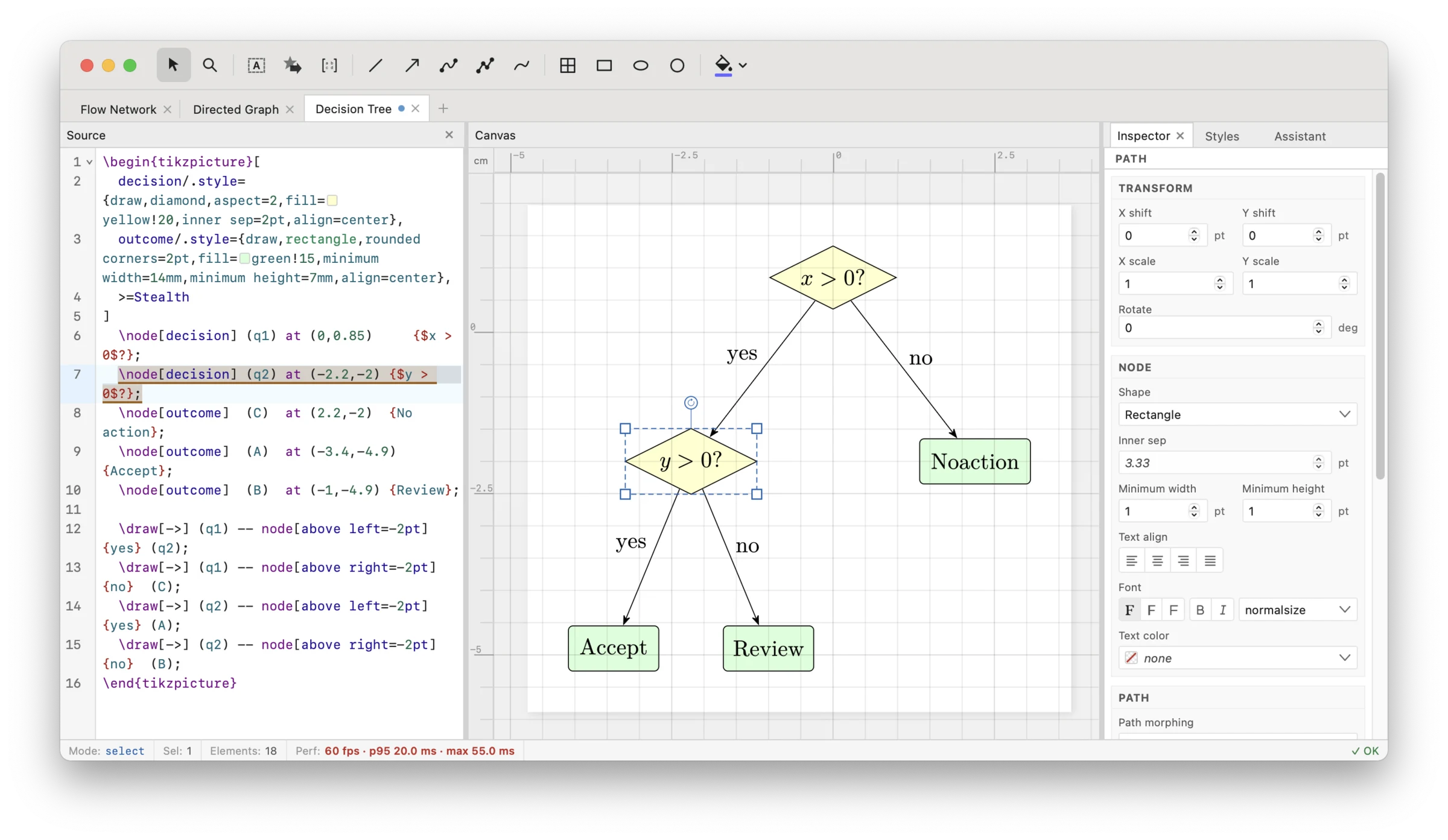
You can start from scratch or edit an existing TikZ figure, or even directly open your paper tex file to edit its images. The TikZ code gets instantly updated as you move around elements, without disturbing existing formatting such as line breaks and spaces.
The app makes fine-tuning the positions of elements easy and instant, without needing to recompile. It supports all common TikZ features including \foreach loops.
The app is free and open source (MIT licensed, code on GitHub). It works on the web or as a lightweight desktop app with some extra features.
Try it: tikz.dev/editor
Features
- Visual canvas with drawing tools: shapes, paths, curves, freehand, Bézier, rectangles, circles, and more
- Live source editor with TikZ syntax highlighting, autocompletion, and number scrubbing
- Two-way sync: edit visually or in code — changes reflect instantly in both views
- Export to SVG, PDF, or PNG
- Import from SVG, IPE, or PPTX
- Multi-figure support for documents with multiple TikZ pictures
Desktop App
Available for macOS, Windows, and Linux with additional features:
- Native file dialogs and system clipboard integration
- AI assistant for help with TikZ
- Automatic updates
Download from tikz.dev/editor.
Supported TikZ Features
The editor supports a wide range of TikZ constructs:
- Shapes: 25+ built-in shapes including rectangle, circle, ellipse, diamond, polygon, star, arrows, callouts, and more
- Paths: lines, curves, rectangles, circles, arcs, grids
- Curves: Bézier curves with control points
- Trees: child operations, tree layout, level/sibling styling
- Matrices: matrix nodes with cell alignment
- Loops:
\foreachin all forms (statement, path, node) - Styling: colors, line styles, fill patterns, shading, transforms
Some features have partial support (decorations, graphs, plots). Advanced constructs like let operations are not yet implemented.
Getting Started
- Open the editor at tikz.dev/editor
- Start with the example or write your own TikZ code
- Use the drawing tools in the toolbar to add and edit elements
- Export your diagram when ready
Development
See DEVELOPMENT.md for build instructions, architecture overview, and contribution guidelines.
License
MIT